Download PDFs with Your Preferred File Name Format 📑
You can now customise the filename format for document PDFs downloaded from Refrens!
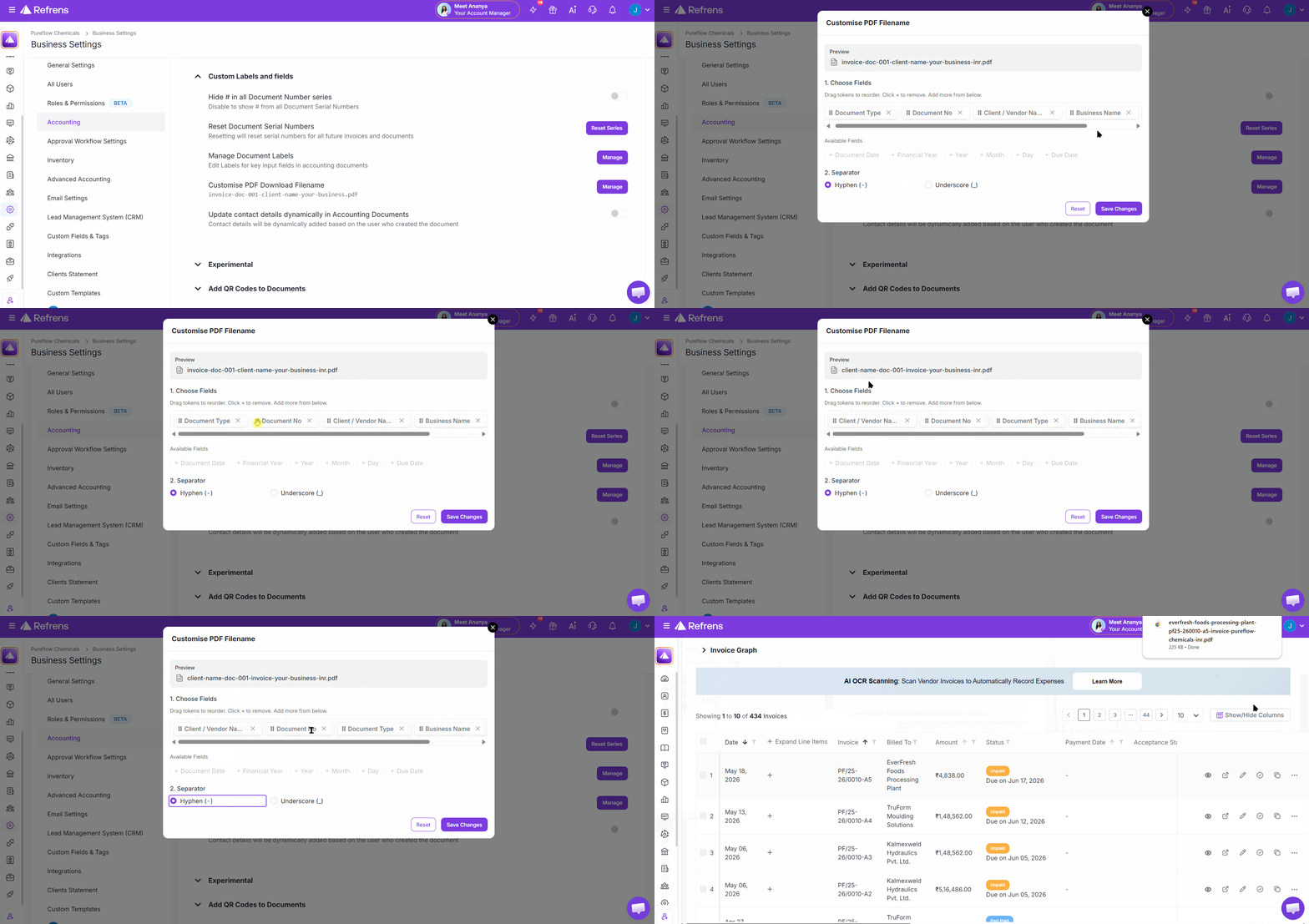
With Custom PDF File Names, you can:
✅ Include important details in the PDF filename, such as document type, document number, client/vendor name, business name, document date, year, month, and download date.
✅ Choose the order in which these details should appear in the filename.
✅ Select whether the filename should use a hyphen - or underscore _ as the separator.
For example, your downloaded PDFs can follow formats like:
invoice-doc-001-client-name-your-business.pdf
invoice-doc-001-your-business-FY2025-26.pdf
doc-001-client-name-14-09-2025.pdf
This makes downloaded documents easier to identify, organise, search, and share with your team, clients, vendors, or accountant.
Just go to Business Settings → Accounting → Custom Labels and fields → Customise PDF Download Filename to set this up!
Better naming of downloaded PDF files
After saving the PDF file, we rename it according to our format/convenience. Can we customized it when save it. Ex: Client Name+Suburb+Date_our CompanyName or something like this..
1
12