Manage the Same Inventory Item in Multiple Units 📦
New Feature
Buying goods in one unit (such as kilograms) and selling them in another (such as bags)?
You can now automatically manage unit conversions in Refrens:
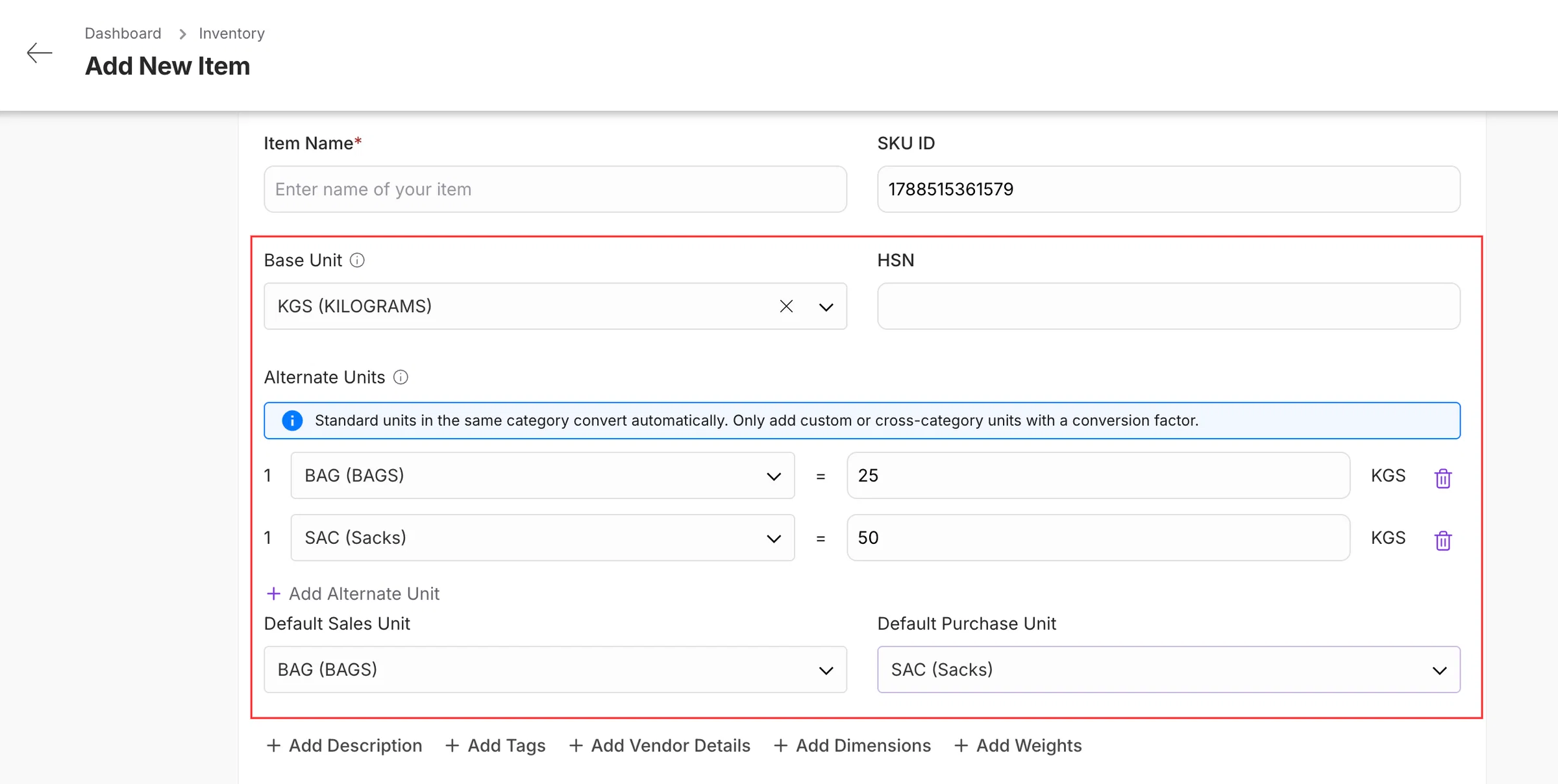
With Units of Measurement, you can:
- Buy and sell the same item in different units
- Add multiple alternate units with conversion factors
- Set separate default units for sales and purchases
- Automatically convert item quantities and rates
- Track inventory consistently in the base unit
For example:
Suppose you purchase and sell rice in different units -
- Base Unit: Kilograms (KG)
- Alternate Unit 1: 1 Bag = 25 KG
- Alternate Unit 2: 1 Sack = 50 KG
- Default Purchase Unit: Sack
- Default Sales Unit: Bag
When you purchase 2 sacks, Refrens automatically adds 100 KG to your inventory.
When you sell 3 bags, Refrens automatically deducts 75 KG from your inventory.
Your purchase documents will use Sack by default, while sales documents will use Bag by default. Your inventory will always remain accurately tracked in KG.
One item. Multiple units. Accurate inventory.
7